
- - Organisations can require participants to confirm specific notices or conditions before joining a meeting.
- - Notifications can be temporarily paused without permanently changing your personal settings.
- - In future, two presenters will be able to share their screen or a window at the same time.
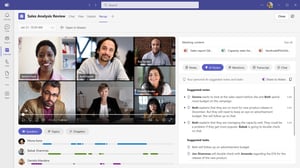
- - The AI-based facilitator identifies unanswered questions and can provide suitable answers via a web search.
- - Express Face Enrolment simplifies the process of setting up a facial profile for supported Teams Rooms scenarios.
- - Suspicious guest invitations can be reported to IT directly from Teams.
An overview of the latest Microsoft Teams updates – Q4 2026
In the fourth quarter of 2026, Microsoft Teams will continue to evolve in several areas. The focus will be on more productive meetings, fewer distractions and greater control over security and compliance-related processes.
It is striking that Microsoft is not merely providing new convenience features. Some updates directly interfere with existing governance processes. These include mandatory consent prior to meetings, the use of web searches by AI agents, and the collection of biometric facial profiles.
For businesses, this means that whilst many of the new possibilities offer clear added value, they should not simply be enabled for technical reasons. It is crucial to deploy these functions in a way that is appropriate to the specific use case, the corporate culture and internal data protection requirements.
Consent before joining the meeting
With this new feature, organisations can require participants to acknowledge a specific message or agree to certain conditions before joining a Teams meeting. Examples might include information regarding recording, confidentiality, transcription or the use of AI features.
If the policy is enabled, it applies to all participants. This includes organisers, internal staff, external guests and anonymous users. Confirmation of this is recorded in the audit log. Administrators can specify a default language and up to four additional languages. The feature is disabled by default and must be configured in the Teams Admin Centre.
In practice, this can be particularly useful for recorded customer meetings, job interviews, training sessions or meetings involving confidential information. It provides companies with an additional way of informing participants transparently about certain conditions.
At the same time, this function should not be equated with consent that is automatically legally valid. Clicking ‘Accept’ does not, in every case, replace the necessary data protection or legal assessment. Furthermore, texts that are too long and complicated can easily lead to participants confirming the terms and conditions without reading them.
Dinotronic’s recommendation: We advise against enabling consent by default for all meetings. Organisations should first define specific meeting scenarios and draft the relevant text in consultation with data protection, legal and compliance departments. Brief and clear notices provide greater transparency than legally overloaded wording.
The general release is currently scheduled for between mid-October and mid-November 2026.
Temporarily pause Teams notification
Teams users will soon be able to pause all notifications for a selected period. Once this period has elapsed, the existing notification settings will be automatically reactivated. This means it is no longer necessary to make permanent changes to individual chats, channels or personal settings.
This is particularly useful for periods of concentrated work, presentations or longer client meetings. For example, if you are working on a quote or a proposal for two hours, you can pause notifications directly via the profile menu and won’t have to remember to switch them back on later. The feature is available on desktop, web and mobile devices. It does not require any additional configuration work for administrators.
The advantage lies in its simplicity. However, potentially important Teams messages are also suppressed during the selected time period. The feature is therefore only of limited use to staff in service, support or on-call roles.
For most staff, this is one of the most useful new features in Q4. We recommend including this feature in internal training sessions on focused working. At the same time, organisations should ensure that business-critical alerts are not distributed exclusively via regular Teams notifications.
As things stand, general availability is scheduled for October 2026.

Split two screens at the same tim
A common limitation in Teams meetings is set to be removed in November 2026. Two presenters will then be able to share their screens or a single window each at the same time. Participants will be able to view both screens simultaneously. The feature has initially been announced for desktop and web only.
This is particularly useful when making comparisons. In a project meeting, two versions of a document can be discussed side by side. In technical support, one person can demonstrate the existing problem whilst a second person demonstrates the solution. Development teams can also view an application and its associated monitoring data at the same time.
The benefits are clear: fewer changes between presenters, fewer interruptions and better visual collaboration. However, on small laptop screens, having two screens shared simultaneously can quickly become confusing. Furthermore, not all the practical details regarding bandwidth, recordings, Teams Rooms, VDI environments and mobile clients are currently available.
We recommend that organisations initially test the feature following its roll-out in project workshops, support cases and technical reviews. Having two parallel streams of content is particularly useful when a comparison or joint analysis is actually taking place. For traditional presentations to a larger audience, a single, clearly structured presentation is often the better choice.
As things stand, general availability is scheduled for November 2026.
Our Microsoft Teams expert
Nico Schwerzmann is a Microsoft Teams specialist at Dinotronic and supports companies on a daily basis with the implementation, optimisation and secure use of modern collaboration solutions. His focus is not only on implementing new features correctly from a technical perspective, but also on clearly demonstrating their practical benefits for day-to-day work. Thanks to his close connection to real-world practice and his in-depth understanding of SME requirements, he combines Microsoft updates with clear recommendations on security, governance and efficient collaboration. His articles help decision-makers and users alike to use Microsoft Teams in a sustainable and future-proof manner.
.png?width=300&name=Designer%20(1).png)
Simpler facial recognition in hybrid meetings
With Express Face Enrolment, Microsoft aims to simplify the process of setting up a facial profile. Users can voluntarily use their camera during a suitable meeting to create such a profile.
In supported Teams Rooms scenarios, the system can then better recognise who is present and correctly attribute their contributions. This is particularly beneficial for transcripts, meeting recaps and Copilot summaries. Instead of generic labels, it becomes clear who spoke in the meeting room. Administrators can enable or disable this feature at an organisational level.
This can significantly improve the quality of the recording, particularly in hybrid meetings where several people are in the same room. However, registration does not mean that a person will automatically be recognised in every meeting or on every device. The feature depends on the room configuration, the hardware, the licences and the supported recognition scenarios. Based on current information, the actual face-based People Recognition feature is particularly relevant for Teams Rooms running on Windows.
The key issue is data protection. Facial profiles constitute biometric data and are therefore particularly worthy of protection. Even if registration is implemented as a voluntary opt-in, this voluntary nature must be genuinely guaranteed within the employment relationship.
Dinotronic recommends that Express Face Enrolment should only be activated following a data protection and legal review. Organisations must explain transparently the purpose of the recognition system, how profiles are managed and deleted, and what alternatives are available to employees who do not wish to create a facial profile. Whilst the increase in convenience is real, it does not justify an uncontrolled roll-out.
General availability is currently scheduled for November 2026.
Report suspicious guest invitations immediately
Collaboration across organisational boundaries has long been part of everyday life in Teams. However, guest invitations can also be used to attempt to misuse the system.
In future, users will be able to report unexpected or suspicious guest invitations directly to their IT department within Teams. Rather than opening a separate support ticket or simply ignoring the invitation, it can be forwarded immediately for review.
This is a useful safeguard, particularly for organisations that frequently collaborate with customers and partner organisations. However, the feature does not prevent an individual from accepting a malicious invitation. It still requires ongoing security awareness on the part of users. Furthermore, without a defined handling process, there is a risk that reports will be received by the IT department but not assessed.
Dinotronic recommendation: Before implementation, it should be established who receives the alerts, how they are prioritised, and what steps are to be taken in the event of a confirmed threat. Awareness-raising communications further enhance the benefits: do not accept unknown invitations too hastily; instead, report them first and have them checked.
The feature is currently under development and is scheduled for November 2026.
Fazit
The new features introduced in the fourth quarter show that Microsoft Teams is continuing to evolve in various areas. On the one hand, minor but annoying hurdles are being removed. Notifications are easier to manage, and simultaneous screen sharing makes workshops, support cases and reviews more efficient.
On the other hand, the demands placed on governance and data protection are increasing. Mandatory consent, AI-powered web searches and biometric facial profiling should not be introduced without clear rules. IT, security, data protection, legal and business departments must work together, particularly when it comes to these functions.
From Dinotronic’s perspective, the option to pause notifications is suitable for widespread implementation. Dual screen sharing and the Facilitator feature should initially be tested with selected user groups. A defined security process is required for suspicious guest invitations. Consent prior to meetings and Express Face Enrolment should only be deployed in production following a thorough compliance and data protection review.
The new features can improve collaboration. However, their benefits only become apparent when technology, processes and user needs work together effectively.
👉 Please contact us for a no-obligation consultation. Together, we’ll assess which Q4 features are relevant to your organisation and how they can be securely integrated into your day-to-day work.
No. The features relating to pausing notifications and mandatory consent are already being rolled out in phases in September 2026. According to the current roadmap, most of the other features are scheduled for November 2026. Roadmap dates are subject to change at any time.
No. As things stand, a suitably licensed person must activate the facilitator. The other participants can see the facilitator’s replies in the meeting chat without needing the same licence themselves.
This depends on the intended purpose, the wording and the applicable law. Organisations should not automatically equate technical confirmation with legally valid consent and should have the texts checked in advance.
No. The actual face recognition functionality depends on the Teams Rooms platform used, the hardware, the licences and the administrative settings. As things stand, face-based recognition is particularly relevant for Teams Rooms on Windows.
No. The reporting function complements existing security measures, but it does not replace technical safeguards or staff training. A clear internal review process remains essential.
Die Funktion pausiert Teams-Benachrichtigungen für den gewählten Zeitraum. Für geschäftskritische Warnungen sollten Unternehmen deshalb zusätzliche Alarmierungswege einsetzen und sich nicht ausschliesslich auf reguläre Teams-Meldungen verlassen.
Our Microsoft Teams expert
Nico Schwerzmann ist Microsoft-Teams-Spezialist bei Dinotronic und begleitet Unternehmen täglich bei der Einführung, Optimierung und sicheren Nutzung moderner Kollaborationslösungen. Sein Fokus liegt darauf, neue Funktionen nicht nur technisch korrekt umzusetzen, sondern deren konkreten Nutzen für den Arbeitsalltag verständlich aufzuzeigen. Durch seine enge Praxisnähe und sein tiefes Verständnis für KMU-Anforderungen verbindet er Microsoft-Updates mit klaren Empfehlungen zu Sicherheit, Governance und effizienter Zusammenarbeit. Seine Beiträge helfen Entscheidern und Anwendern gleichermassen, Microsoft Teams nachhaltig und zukunftssicher einzusetzen.