

- - What auditors specifically require
- - Unified Audit Log: the core of traceability
- - Retention Policies: retention as a governance instrument
- - eDiscovery: targeted search for audit situations
- - Segregation of duties and administrator access
- - Annual ICT status report to executive management
- - Audit readiness as a permanent operating state
- - Frequently asked questions (FAQ)
Missing log data cannot be recreated retrospectively, which is why an audit-ready M365 environment must be in place well before an audit is announced. The Unified Audit Log is at the heart of traceability; for 12-month retention, at least E3/E5 or Business Premium is required, whilst for 10-year retention in accordance with OR Art. 958f, Microsoft Purview Audit Premium is required. Retention policies ensure the preservation of content, eDiscovery enables targeted searches during audits, and a clear separation of roles with minimal administrator rights is a common audit point. Important: Audit logs and retention policies serve different regulatory purposes and must not be confused. Audit readiness is an ongoing operational state, not a one-off project.
The email often arrives at short notice: your supervisory body has announced an audit. Over the coming weeks, an auditor will be scrutinising your ICT governance, your data protection measures and your security arrangements.
Anyone who starts configuring the M365 environment at this stage has already lost out – not because it is too late, but because missing log data cannot be generated retrospectively. The audit log must have been active for months. Retention policies must already have archived documents. Access rights must have been properly structured for some time.
This article explains what makes a Microsoft 365 environment audit-ready and which settings you should configure today – not tomorrow.
Typical questions asked by auditors during audits
Supervisory organisations and auditors examining asset managers do not just look at contracts and policies. They ask concrete technical questions:
-
«Can you show me who accessed this client file in the last 12 months?»
-
«How do you ensure that deleted emails remain archived?»
-
«Who in your organisation has administrator rights, and when were they granted?»
-
«Can you provide your ICT status report along with the corresponding control evidence?»
FINMA states clearly: control evidence must be filed in an orderly manner and ready for review. Logs, records and access reviews are not optional documents. They are mandatory.
Unified Audit Log: the cornerstone of traceability
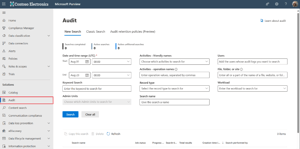
The Unified Audit Log in Microsoft 365 records all relevant activities in your environment: logins, document access, email activity, administrative changes, file downloads and shares with external users.
Important to know:
-
The audit log is active by default in most M365 plans. Microsoft currently states a retention period of 180 days for Audit Standard.
-
For 12-month retention and extended retention configurations, Microsoft Purview Audit (Standard) with the corresponding licence (at minimum E3/E5 or Business Premium) is required.
-
For 10-year retention, as required under Art. 958f CO for business records, Microsoft Purview Audit Premium is needed.
-
Note: audit logs and retention policies serve different regulatory purposes and should not be confused. Audit logs document activities and access; retention policies ensure the preservation of content.
Activating and correctly configuring the audit log should be one of the first measures every asset manager takes.
Retention Policies: Retention as a Governance Tool
The Swiss Code of Obligations (Art. 958f CO) mandates a 10-year retention obligation for business records. The FADP, conversely, requires that personal data not be retained longer than the purpose requires. Both can be addressed with correctly configured retention policies in Microsoft Purview:
-
Emails with business relevance: retain for 10 years
-
Internal chat messages: depending on content and classification
-
Temporary working documents: delete after a defined period, unless a retention label has been applied
These rules also apply when a user manually deletes an email or a document. Microsoft 365 preserves the content in a protected area, which remains retrievable for audits.
eDiscovery: targeted searches for audit situations
Imagine an auditor asking for all emails and documents exchanged in connection with a specific client during a specific period. With the eDiscovery function in Microsoft Purview, you can process this request in a structured and complete manner.
eDiscovery is also useful for internal investigations: did a former employee copy or delete data shortly before resigning? What was shared during a specific period? Prerequisite: the audit log must be active and configured for a sufficient retention period.
Download tip: ICT checklist for asset managers
Developed from practical experience with FINMA-regulated asset managers and family offices: Our checklist provides a concise summary of the key ICT requirements and helps identify gaps in governance, security, and documentation.
Role separation and administrator access
A common audit finding: too many users have global administrator rights. This is a security risk and contradicts the principle of segregation of duties, which FINMA regards as an important governance requirement, although it accepts compensating measures for smaller asset managers provided these are documented in writing. Best practices:
-
Use dedicated admin accounts (not the regular work account)
-
Principle of least privilege: everyone receives only the rights required for their task
-
Privileged Identity Management (PIM): elevated rights are granted only when needed and for a limited time
-
All administrator activity is logged in the audit log
Annual ICT Status Report to the Management Board
FINMA expects executive management to be demonstrably involved in material ICT decisions. A documented reporting rhythm together with an annual ICT status report is considered the minimum standard. Microsoft 365 offers Compliance Manager, a dashboard that provides a clear overview of the environment's current security status, useful as a basis for exactly this report.
Audit readiness as a permanent state of operation
Audit preparation is not a project phase that gets completed once. Configurations change, new employees join, licences get switched. What is correctly configured today can have gaps in six months.
At Dinotronic, audit readiness is a fixed component of our managed services for FINMA-regulated asset managers and family offices. As a Microsoft partner with ISO 27001:2022 certification and over 30 years of experience, we continuously review the relevant settings, inform you of changes, and ensure that your environment is audit-ready at all times.
Would you like to know how audit-ready your current M365 environment is? We are happy to conduct a non-binding ICT readiness check.