

- - Channel notifications can finally be managed centrally
- - Private backstage chats for organizers and presenters
- - Word, Excel, and PowerPoint open more consistently in Teams Mobile
- - Ad hoc room reservations directly in Teams Room
- - Forwarding calls will become noticeably easier
- - Copilot will also understand shared content during meetings
- - Meeting insights are retained even after the transcripts expire
- - Recently used emojis are synced across all devices
- - Conclusion
- - FAQ
- - Greater efficiency through improved notifications in channels
- - New flexibility: Organizers can hold private chats
- - Mobile productivity gets a major upgrade
- - Teams Rooms become even more convenient for spontaneous use
- - Simplified call forwarding saves time in everyday use
- - Copilot provides more precise insights and lasting meeting knowledge
- - Emojis are finally synced consistently across devices
An overview of the latest Microsoft Teams updates – Q3 2026
More productivity, more automation, More focus
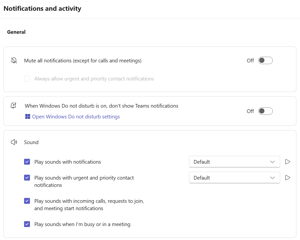
Channel notifications can finally be managed centrally
One of the most inconspicuous —but arguably most useful— updates concerns channel notifications. Until now, users often had to click through individual channels to customize their notifications. With this new feature, Teams now has a central location in the settings where users can review and customize their notifications for all visible channels. Microsoft explicitly describes this as simplified and centralized management of channel notifications. According to the current roadmap, July 2026 is the target date for general availability.
The real added value lies not only in “fewer clicks,” but in greater control. Over time, many companies end up with a large number of teams and channels: project work, customer communication, internal coordination, service, and operational issues. What seems sensibly structured at first often turns into a jungle of notifications later on.
In practice, this means that important customer or escalation channels can be prioritized more easily, while less critical areas remain in the background. This is especially helpful for employees who work with many channels simultaneously but still want to ensure that relevant information doesn’t get lost in the background noise.
Private backstage chats for organisers and presenters
A major enhancement for structured meetings, webinars, and town halls is the new private chat for organizers, co-organizers, and presenters. This chat is separate from the participant chat and is available before, during, and after the event. According to the latest information, Microsoft will begin rolling out the feature in Targeted Release starting in mid-July 2026; widespread availability is currently scheduled for early to mid-August 2026.
At first glance, this may seem like a minor detail, but in reality, it’s a real improvement in the quality of organized meetings. Until now, moderators often had to rely on separate chat rooms, secondary devices, or spontaneous messages to coordinate internally during an event. Going forward, there will be a clear, integrated backstage channel for this purpose.

Word, Excel and PowerPoint open more consistently in Teams Mobile
Microsoft is also addressing a common pain point in mobile use. Word, Excel, and PowerPoint files now have a standardized preview experience in Teams on iOS and Android. According to Microsoft, this ensures faster performance, greater reliability, and a more consistent display.
Why is this important? Because mobile collaboration often fails not because of a lack of features, but because of inconsistencies. Documents often behave differently on a smartphone or tablet than they do on a desktop; they may take longer to open or appear differently depending on the file type. This is exactly where Microsoft aims to standardize the experience. Für Endanwender bedeutet das: weniger Medienbrüche, weniger Unsicherheit beim schnellen Nachsehen unterwegs und mehr Vertrauen darin, dass Dokumente in Teams mobil zuverlässig angezeigt werden. For end users, this means fewer media breaks, less uncertainty when quickly checking documents on the go, and greater confidence that documents will be displayed reliably on mobile devices in Teams.
Ad hoc room bookings directly via Teams Room
Spontaneous meetings are part of everyday office life, and that’s exactly where unnecessary delays often occur. With the “Ad-hoc room reservation from Teams Rooms on Windows console” feature, rooms can be booked directly on the Teams Rooms system for immediate use. Microsoft states that the goal is to avoid scheduling conflicts and enable spontaneous meetings without interruption. The feature is currently still in development and is scheduled for release in July 2026; it will be available to Teams Rooms Pro license holders.
This is particularly relevant for modern offices with shared spaces. In practice, many companies are familiar with this situation: A room is available but not reserved. A team wants to get started right away but isn’t sure if someone else will need the room in ten minutes. Making a direct, ad-hoc reservation at the room terminal eliminates this uncertainty. The room is immediately and clearly assigned, which provides much greater transparency for both users and space planners.
Forwarding calls will become noticeably easier
The impact of this will be greater in everyday life than this brief description might suggest. Especially in service-oriented teams or in roles that handle a high volume of incoming calls, every unnecessary interaction counts. When call transfers are cumbersome, they lead to delays, follow-up questions, and—in the worst case—a negative impression on the caller. A streamlined handoff makes communication more professional and lowers the barrier to entry for employees who don't work with complex call flows on a daily basis.

Copilot will also be able to understand shared content during meetings in future
It’s worth taking a closer look here, because the term is often shortened in everyday conversation. This feature isn’t simply about “more precise summaries,” but specifically refers to Copilot’s ability in Teams to analyze screen content shared during a meeting. This allows Copilot to access not only the transcript and meeting chat but also content from slides, documents, spreadsheets, or websites—provided they were visible during the meeting. The current roadmap specifies August 2026 as the rollout period for this.
This significantly improves the quality of follow-up questions and summaries. Until now, Copilot has been heavily reliant on what was said or written during meetings. Going forward, the AI will be able to take into account the context of what was actually displayed on the screen. This is particularly relevant for meetings in which content is presented visually, such as sales decks, proposal presentations, Excel reports, or web demos. Based on this, participants can then ask much more precise questions—for example, about numbers on a slide, feedback on specific content, or sections of a document that were discussed together.
However, there is an important prerequisite: Microsoft states that this feature only works if the meeting is recorded and transcribed. Additionally, according to the Message Center description, content must have been shared for more than 10 seconds for Copilot to use it for later analysis. This is also a relevant governance consideration for companies that handle sensitive information in meetings.
Knowledge gained from meetings is retained even after the transcripts have expired
Why this is so exciting: Many companies today face a conflict of objectives: they need to avoid keeping transcripts for too long due to data protection, storage, or compliance concerns, but at the same time, they don’t want to lose valuable insights from meetings. Microsoft is now better separating these two aspects. Not all of the raw data needs to be retained permanently, but key insights derived from AI can remain available so that Copilot can continue to answer questions about past meetings even later on.
This can dramatically change the long-term value of meetings. Decisions, open issues, contexts, and knowledge are no longer just “momentary knowledge” that disappears into the archives after a few weeks. This can be a major step forward, especially in longer-term client projects, during hand-offs between teams, or in recurring steering committee meetings. At the same time, this is an issue that should be properly managed from a governance perspective, because data retention policies, Copilot usage and compliance are becoming more closely intertwined here.
Recently used emojis are synchronised across all devices
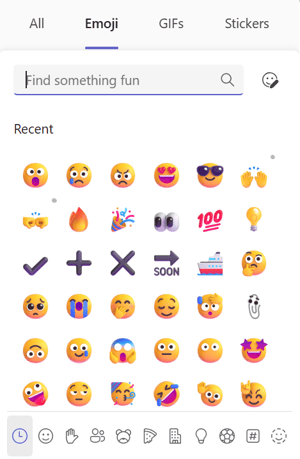
Not every useful feature has to be complex. With this feature, Microsoft is introducing synchronization of recently used emojis and reactions across all supported Teams clients. These include Android, iOS, Mac, Windows Desktop, and the web. The feature is enabled by default and requires no additional configuration.
Conclusion
The most exciting insight from this Q3 release isn’t a single “wow feature,” but rather the synergy of the updates. Microsoft Teams is maturing in many ways: notifications are becoming easier to manage, structured meetings are more professional, spontaneous room booking is simpler, calling is more efficient, and Copilot is more deeply integrated into real-world meeting workflows.
These improvements are particularly crucial for companies that have long since stopped using Teams merely as a chat tool and now rely on it as a central work platform. After all, productivity rarely stems from a single major feature, but rather from the removal of many small obstacles.
👉 Contact us for a no-obligation consultation and learn how you can make the most of Microsoft Teams for your business.

Our Microsoft Teams expert
Nico Schwerzmann is a Microsoft Teams specialist at Dinotronic and works with companies on a daily basis to help them implement, optimize, and securely use modern collaboration solutions. His focus is not only on implementing new features correctly from a technical standpoint, but also on clearly demonstrating their practical benefits for day-to-day work. Thanks to his practical experience and deep understanding of SME needs, he combines Microsoft updates with clear recommendations on security, governance, and efficient collaboration. His insights help decision-makers and users alike to use Microsoft Teams in a sustainable and future-proof way.