
-
- Q2 brings no major releases, but useful optimizations for everyday work.
-
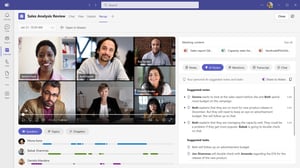
- AI-based video summaries make reviews and documentation easier.
-
- Company branding can now also be integrated into reactions.
-
- Miracast enables wireless, fast presentations in Teams Rooms.
-
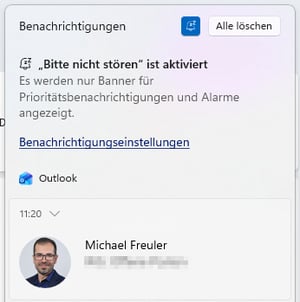
- Teams respects the Windows Do Not Disturb mode—perfect for focus time.
-
- Copy & paste supports interactive content more reliably.
-
- Mac users benefit from improved account switching.
The latest Microsoft Teams updates at a glance – Q2 2026
While Microsoft Teams made some major progress in the first quarter of 2026, the second quarter is comparatively quiet. No major releases, no radical innovations, but a series of small yet highly practical improvements that noticeably simplify everyday work.
It is precisely these incremental updates that make Teams more efficient, consistent, and user-friendly in daily use. We’ll show you which new features are particularly relevant.
AI-powered video summaries
Branded Meeting Reactions
Companies can now integrate their own reaction icons into Teams. Whether it’s a company logo, event emoji, or campaign symbols, reactions can be uploaded individually and become part of the meeting culture. Perfect for internal events, town halls, or virtual team building.
We recommend working together with marketing or HR to create a small set of icons that combines humor with corporate identity—for stronger engagement and a greater sense of connection in virtual meetings.
Miracast support in Teams Rooms
Teams Rooms on Windows now support Miracast. This provides a particularly simple way to share content wirelessly without any prior configuration. The feature significantly simplifies spontaneous meetings and presentations, as users do not need any additional apps or cables.
How does Miracast work with Windows?
Miracast creates a direct peer-to-peer connection between your Windows device and the Teams Room without Wi-Fi, VPN, or network access. This allows you to share your screen within seconds:
-
Press Windows + K on your Windows device
-
The Teams Room appears automatically in the device list
-
Select the room
-
Your screen is instantly shared wirelessly
This makes Miracast ideal for meetings with spontaneous presentations, short-notice screen sharing needs, or guest presentations—without any setup effort.
Dinotronic recommendation
-
Encourages spontaneous collaboration: Ideal for ad hoc meetings—no cables, no switching
-
In-room signage: Place a small note like “Want to share your screen? Press Windows + K.” Usage typically increases significantly
-
Check device compatibility: Not all older Windows devices support Miracast—a quick check in advance provides clarity
-
Perfect for guests: No network login is required, so external participants can get started immediately
Teams syncs with Windows Do Not Disturb
Teams now automatically detects the Windows “Do Not Disturb” mode. When DND (Do Not Disturb) is activated, Teams also pauses all notifications. Perfect for focused work, deep work, or presentations.
We recommend that companies actively include this feature in productivity trainings. Many employees are not even aware of DND, even though it is one of the most effective tools for reducing digital distractions.
Improved copy & paste functionality for messages
Teams now preserves the full structure when copying and pasting messages:
-
@mentions remain interactive
-
Tags and contacts are retained
-
Content only falls back to plain text when absolutely necessary
This makes it easier to reuse chat content, for example in emails, documentation, or service requests.
Ideal for support and project teams that frequently reuse content from chats. We recommend including this feature in internal best practices to improve documentation quality.
Native account switching on Mac
Mac users can now easily switch between different accounts and tenants directly via native controls in the Dock and menu bar. This saves time and makes navigation much simpler.
Especially useful for users with multiple tenants or consultants. We recommend providing a short training note for Mac users—the feature is intuitive, but often not immediately visible.
Conclusion
Even though Microsoft Teams does not introduce major, groundbreaking innovations in Q2 2026, the updates presented are far more than just minor improvements. They clearly show the direction the platform is heading: greater simplicity, higher efficiency, and even more seamless integration into daily workflows.
From smarter meeting summaries and more branding options in virtual meetings to wireless presentations via Miracast, Microsoft is optimizing Teams where it truly matters in everyday use. These “small” features often make the biggest difference for users: fewer clicks, fewer friction points, more flow.
👉 Contact us for a non-binding consultation and find out how you can make the most of Microsoft Teams in your organization.
Our Microsoft Teams expert
Nico Schwerzmann is a Microsoft Teams specialist at Dinotronic and supports companies daily in the implementation, optimization, and secure use of modern collaboration solutions. His focus is not only on technically correct implementation of new features, but also on clearly demonstrating their practical value for everyday work. With his close connection to real-world use cases and deep understanding of SME requirements, he combines Microsoft updates with clear recommendations on security, governance, and efficient collaboration. His contributions help both decision-makers and users to leverage Microsoft Teams in a sustainable and future-proof way.