
Operating Microsoft 365 technically and configuring it in a regulatorily correct manner are two different things. For FINMA-supervised asset managers, M365 counts as outsourcing, which makes documented contracts with FINMA audit rights, a clearly defined data location and a demonstrable outsourcing concept mandatory. The most common audit-relevant gaps are an audit log that is not activated or only partially activated, missing retention policies (Art. 958f CO: 10 years) and missing data loss prevention.
Overall responsibility always remains with the institution, even in the case of complete outsourcing. A correctly configured M365 operation is not a one-off project, but a permanent state that must be continuously maintained.
We hear the same phrase from many asset managers: “We’ve been using Microsoft 365 for years and it works without a hitch.” What is often left unsaid is: “without a hitch until the next audit by the regulatory body.”
There is a significant difference between ‘it works technically’ and ‘it is configured in accordance with regulatory requirements’. And this difference can become a serious problem in the event of an audit by FINMA or a recognised supervisory body, with consequences for the operating licence.
This article explains what matters, what FINMA expects from supervised institutions, and what compliant M365 operations look like in practice.
What FINMA expects regarding the use of the cloud
Since the Financial Institutions Act (FinIA) entered into force on 1 January 2020, independent asset managers require a licence from FINMA and are continuously supervised by recognised supervisory organisations. This means clear requirements apply to governance, risk management and the handling of outsourcing.
Anyone outsourcing material IT functions to third parties, and this applies to every cloud solution, must ensure that overall responsibility remains with the institution. This is a fundamental principle that FINMA consistently examines: responsibility cannot be transferred to the service provider, not even in the case of complete outsourcing.
For outsourcing arrangements, FINMA requires that contracts with external ICT providers regulate at least the following: the institution's responsibilities, control and instruction rights, as well as access and audit rights, including for FINMA itself. FINMA Guidance 03/2024 underlines that many supervised institutions do not maintain a complete inventory of their service providers and define unclear security requirements towards service providers. This is an audit-relevant finding.
Microsoft 365 is, in this sense, an outsourcing provider. Full stop.
In addition, the revised Federal Act on Data Protection (FADP), in force since September 2023, imposes increased requirements on the documentation of data processing, the duty to report data breaches, and the information of data subjects. Client data held by asset managers clearly falls within the scope of protection of the FADP.
Download tip: ICT checklist for asset managers
Developed from practical experience with FINMA-regulated asset managers and family offices: Our checklist provides a concise summary of the key ICT requirements and helps identify gaps in governance, security, and documentation.
The most common configuration errors in practice
In our daily work as a managed service provider for financial service providers, we see the same gaps again and again in M365 environments:
1. No defined data storage location
Depending on the tenant configuration and the selected region, Microsoft generally stores data in regional data centre clusters. Anyone who needs to demonstrate to supervisory authorities where their customer data is located requires a clear configuration and the appropriate contractual basis with Microsoft – including a written outsourcing agreement granting FINMA the right of inspection.
2. Audit log not enabled or not fully configured
The audit log in Microsoft 365 is not enabled for all types of activity in standard configurations. The default retention period for standard business plans is generally 180 days. Microsoft Purview Audit Premium is required for longer retention periods. Important: Audit logs and retention policies serve different regulatory purposes and must not be confused with one another.
3. Keine Retention Policies
Without defined retention policies, emails and documents are deleted as soon as employees delete them. This contradicts the retention requirements of the Code of Obligations (Art. 958f CO: 10 years for business records).
4. No Data Loss Prevention (DLP)
FINMA Guidance 03/2024 explicitly states that DLP measures are incomplete at many supervised institutions and do not adequately capture critical data. Without DLP policies, sensitive client data can be shared without restriction.
5. No documented outsourcing strategy
Anyone using M365 ‘as is’, without treating the contractual relationship with Microsoft as a regulatory outsourcing arrangement, risks facing objections during audits – regardless of how sound the technical configuration is.
What a regulatory-compliant M365 environment actually comprises
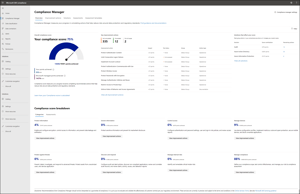
An audit-ready Microsoft 365 environment for asset managers typically includes the following building blocks:
-
Information security concept (CIA): Confidentiality, integrity and availability of client data are addressed in a written concept. FINMA does not prescribe a specific standard; ISO 27001 is considered a recommended reference, but is not mandatory.
-
Microsoft Purview Compliance Portal: Central control instrument for all compliance-relevant settings: retention policies, DLP policies, sensitivity labels and eDiscovery
-
Sensitivity labels: Documents and emails are classified (e.g. «Public», «Internal», «Confidential – Client Data»). Labels can activate protective functions: encryption, forwarding restrictions, watermarks.
-
Retention policies: Defined retention periods aligned with Art. 958f CO (10 years for business records) and the FADP. Content is preserved even if employees delete it manually.
-
Multi-factor authentication (MFA) for all users: MFA is now considered a basic security measure and is effectively expected by auditors and supervisory organisations. Foregoing MFA is assessed as a critical gap in any serious ICT audit.
-
Role-based access rights: Access rights are assigned according to the principle of least privilege and are reviewed regularly. Cleanup takes place immediately upon departure or change of role.
-
Documented outsourcing contract: Microsoft Customer Agreement, Data Processing Agreement and Service Level Agreements documented in writing and recorded as part of an ICT inventory, including documented rules on control, information and audit rights within the Microsoft contractual landscape.
Running M365 is not a project – it is an ongoing process
A one-off setup is not enough. Microsoft continuously updates its services and licensing terms. At the same time, regulatory requirements keep evolving. Anyone wanting to operate a regulatorily correct M365 environment needs someone to keep an eye on this on an ongoing basis.
This is exactly where Dinotronic's managed services come in. As a Microsoft partner with 30 years of experience and ISO 27001:2022 certification, we support FINMA-regulated asset managers and family offices with ICT compliance and building secure digital working environments. We know the requirements from practical experience, and we do not just set up M365 environments, we operate, monitor and continuously adapt them.
This depends on the licence and the regulatory requirement. The default retention period is 180 days. For 12-month retention, at least an E3, E5 or Business Premium licence with Microsoft Purview Audit is required. For the 10-year retention obligation under Art. 958f CO, Purview Audit Premium is needed.
FINMA does not prescribe a specific standard. However, a written information security concept that addresses confidentiality, integrity, and availability is mandatory. ISO 27001 is considered a recommended reference and makes it easier to demonstrate compliance to supervisory bodies, but it is not a mandatory requirement.